The work in the following reel is created using Softimage, Terragen, Nuke and PFTrack.
Text in the bottom right shows what I created for each shot.
See PDF for further details. Download PDF shot breakdown
Edited on 15th Oct – Now updated with work from The Bible Series and How To Build a Planet
For the past few months I’ve been working at Lola Post, London, on Mankind, soon to be shown on the History channel both here in the UK and the USA.
I worked on quite a few sequences, 30 shots in total. Most of these involved creating projectiles of differing sorts, predominantly arrows; People firing arrows, being shot by arrows, and avoiding arrows while simultaneously cheating the whole archer deal by using guns. All arrows in the sequence above are CG.
As with many documentaries, many shots on Mankind were illustrative map shots, presented as full scale Earth scenes and as full CG shots they were subject to much change. Luckily, the flexibility of CGI makes it easy to work outside the boundaries of reality and to change one’s mind.
A few of the shots I worked on involved creating digital sets. Firstly I created an aqueduct for a sequence of shots with Caesar in. This was a case of tracking shots, matching on set details and extending upwards.
The trickiest shot was a bullet time shot, first in the sequence above, showing an Irish navvy unwittingly getting a little too close to a tunnel blast within the Appelacians. The original footage was green screen with the actor effectively sitting on a green pole with the camera moving around him. This introduced a wobble but was significantly easier and cheaper than a timeslice rig. As the footage was ramped up and down as well as being slow mo, getting rid of the wobble was high priority and after many tests it was eventually solved with simple yet nifty 3d camera trickery.
To smooth out the wobble, I followed a suggestion of Lola’s MD, Grahame. Having tracked the raw footage in PFTrack I projected that original footage through the camera in Softimage onto a card, positioned where the actor should be. That way the actor stayed in the same place in 3d space whilst I moved my new 3d camera around him.
The entire environment in that shot is a 3d set I threw together out of multiple particle instances of the same handful of rock models.
Most of the other shots were relatively straight forward, the exception being another bullet time shot, this one actually being one of the first bullets ever fired! The footage for the start of the shot was different to that of the end, so although the start had lots of people thrusting spears and poles in a smokey landscape, the end was completely clear of people and smoke, plus the target dummy was way too near. To solve this I made a new 3d gun, texturing it with various camera projected textures from the original footage, then made a new background out of a humongous psd stitched together out of footage and photos. In the end none of the original footage is being used as footage, more as texturing inspiration! It’s a really long shot so I split it in the sequence above.
All the work I did on this show bar the Earth-scale shots was rendered using Arnold. This has an advantage over Mental Ray of being a fast method of getting realistic lighting complete with indirect light bouncing. The quality is superb. To me, Mental Ray is much more flexible, but Arnold trumps it for speed between initial light placement and realistic render. I’m very glad I’ve forced myself to learn it.
A few of the aforementioned Earth-scale map shots are shown below.
The first part, Journey to the Centre of the Planet, received praise all round on the whole which is great. Best thing I saw on Twitter was “Wouldn’t it be great if Richard Hammond reached the centre of the planet only to discover it was made of lego?”
From September til December-ish I was working on Atlantis. Lola (www.lola-post.com) was creating visual effects for almost the entire thing, 550 shots, so there was plenty for each of us to do. In my case, I was working on falling volcanic rocks and boats, then seas. There’s a lot of sea involved in this show, much of which is actually real, but the rest is created using Aaman Akram’s aaOcean suite of shaders and deformers in Softimage.
All the shots were broken down into different passes, with that being especially essential for the sea shots. Water behaves oddly at sea. It’s hard to tell the scale of a large wave versus a small one without something giving you a visual cue. By creating various mattes and animating the large waves at different speeds to the smaller waves sat on top, we were able to keep the scale in check, adding elements like foam and colour variation depending on the shot composition.
Prior to this, I was involved in the pre-vis stage of the boat shots. Many of them involve particularly dramatic moments and it was necessary to nail exactly how they were going to work before getting bogged down in rendering water at HD. Pre-vis is short for pre-visualisation, whereby each shot is roughed out using rudimentary elements or low detail assets to get a feel for timing, scale, composition and so on. By having this stage, it’s possible to work something into the edited sequence as quickly as possible to see if it actually works. It saves a lot of time and takes some guesswork out.
Atlantis – End of a World, Birth of a Legend will be broadcast in mid March.
For now, here’s a preview on Youtube. There’s a making of and a couple of sequences in there too.
Set your recording equipment up for 9pm on May 5th as that’s when Strike Back is due to begin! Oddly although it’s 6 episodes long, they’re being shown in pairs, so air dates are as follows:
Episodes 1 & 2 Wed 5 May 21.00 Sky1 HD & Sky1
Episodes 3 & 4 Wed 12 May 21.00 Sky1 HD & Sky1
Episodes 5 & 6 Wed 19 May 21.00 Sky1 HD & Sky1
Looking forward to the 19th!!! That’s where a lot of our work went.
I’m gonna get a few people to record this for me in case one or the other reveal themselves to be lame at setting recorders. There are people out there who can’t use Sky Plus let alone set an old VCR.
During the past 5 weeks or so I have been working on some VFX shots for Strike Back, soon appearing on Sky 1 and Sky 1 HD. Trailers and teasers have appeared on TV and inevitably Youtube and pals. Myself, Sascha Fromeyer and Ashley Hampton, have been beavering away on all manner of things.
I’m looking forward to watching this. All of my contributions to this are in Episode 5, so I know what happens in that and the final episode and have no idea what happens at the start!
Strike Back is based on a novel by Chris Ryan, set in the Middle-East and filmed in South Africa. It’s a hostage situation and my God… it’s cool. Watch it.
After what seems like an eternity of promising it’s on its way, the VFX reel has arrived. A fair amount of this is new to the site. Some of the new content relates directly to previous posts on TV shows that have been on in the past year.
Film 4’s Frightfest was on again this year at the Empire in London’s Leicester Square.
I was one of a few freelancers lucky enough to work on Tom Six’s ‘Human Centipede’, a thoroughly odd concept for a film. I briefly mentioned this in a previous post, incorrectly referring to it as the Human Caterpillar. I guess a caterpillar does seem slightly cuter than a centipede! The rough premise for this is that a surgeon, previously separating siamese twins for a living, is now collecting people to build a centipede where each person’s mouth is stitched to the anus of the person in front. Yup. You read that correctly.
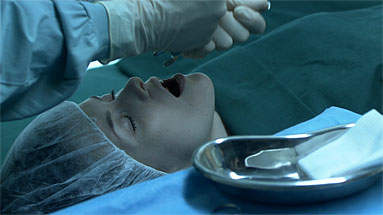
My part in this was to fix a few things in After Effects that couldn’t be sorted on set. The lady above is having her teeth removed in order to facilitate the passage of waste from the person in front. In that instance is was up to me to remove teeth from the 3 shots involved. The rest was mostly tracking stuff, and a few blood spatters, but there were a couple of time consuming shots involving animating a load of rain drops on a car window. The shots were filmed out of sequence on a night when it genuinely was raining, but some were missing the obvious rain drops one expects from having just driven through rain. The best bit about this was Tom Six saying something like “Rain from a rain machine always looks shit. Nothing like rain,” a statement I highly agree with. Lovely guy. The kind of person you wouldn’t expect to come up with a film about stitching people together in a chain.
Last night was the Television BAFTAs, this being the time of year when shares in sequins go through the roof. The Best Drama Series Award went to Wallander, produced by and starring Kenneth Branagh.
So how does this relate to me in the slightest? I did a couple of VFX sequences in that I’ll have you know! All being well, one of them will be in the show reel I am currently piecing together. There was a lot of fog at one point, some of which is 3D fog created in XSI’s ICE engine then composited in After Effects, the aim being to cover up gaps in the smoke machine’s efforts.
[Edit] Now that March 12th has past, iscience is now longer on BBC iplayer.
My work on BBC iScience is on iplayer again now. This particular episode is nanotechnology. (Can I get a woooOOOooo?) Pretty much all of the 3d graphics are my creation, even the ones which seem at first glance to be 2d. They are cel shaded 3d! (Same approach as on Futurama) They include animations on fusion, uv radiation, cell division and all sorts.